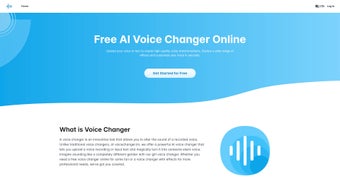

Download VoiceChanger – AI‑Powered Voice Transformation Tool
Overview
VoiceChanger.im is a cloud‑based AI voice changer that lets you upload an audio file or paste text and receive a fully transformed recording in minutes. Powered by state‑of‑the‑art neural networks, the service can mimic a wide spectrum of vocal characteristics—from robotic synth tones to lifelike human voices—while also offering a standout gender‑conversion engine that flips a voice from male to female or vice‑versa with uncanny realism. The platform is built for creators, gamers, podcasters, and anyone who needs to anonymize or stylize speech without investing in expensive hardware or complex software suites.
Although VoiceChanger is not a live‑streaming solution, its processing speed feels “real‑time” because the AI renders the output as soon as the file is uploaded, often within 30 seconds for a typical three‑minute clip. A free tier grants access to a limited set of effects, allowing new users to test the technology before committing to a paid plan that unlocks the full library, higher‑resolution output, and batch processing capabilities. The intuitive web interface, multilingual support, and secure HTTPS connection make VoiceChanger a trustworthy, user‑friendly choice for anyone looking to add a creative twist or an extra layer of privacy to their audio projects.
Key Features & Capabilities
- AI‑Driven Voice Morphing: Uses deep learning models trained on thousands of hours of speech to produce natural‑sounding transformations.
- Gender Conversion Engine: One‑click switch between male and female voices while preserving pitch, timbre, and emotional nuance.
- Extensive Effect Library: Over 40 presets ranging from classic robot, alien, and echo effects to subtle “studio‑grade” enhancements.
- Text‑to‑Speech Integration: Input plain text and let the AI generate a spoken version before applying any chosen effect.
- Batch Processing (Premium): Upload multiple files at once and receive a zipped folder of transformed audio.
- High‑Resolution Export: Choose between MP3 (128 kbps) for quick sharing or WAV (44.1 kHz) for professional production.
- Secure Cloud Storage: All uploads are encrypted in transit (TLS 1.3) and deleted automatically after 24 hours.
- Cross‑Platform Accessibility: Works in any modern browser on Windows, macOS, Linux, Android, and iOS without additional downloads.
- Free Tier with No Watermark: Limited to three effects per day, perfect for casual experimentation.
- API Access (Enterprise): Integrate VoiceChanger’s engine into your own applications via a RESTful endpoint.
Installation, Usage & Compatibility
Getting Started – No Installation Required
VoiceChanger is a web‑based solution, so there is nothing to install on your device. Simply navigate to voicechanger.im using a supported browser (Chrome, Firefox, Edge, Safari) and create a free account. After confirming your email, you’ll land on the dashboard where the upload widget resides.
Step‑by‑Step Workflow
- Upload or Type: Click “Upload Audio” to select a WAV/MP3 file (max 50 MB) or choose “Enter Text” to generate speech.
- Select an Effect: Browse the effect list on the left panel; hover for a 5‑second preview.
- Configure Settings: Fine‑tune pitch, speed, and intensity sliders for a personalized touch.
- Process: Hit “Transform” and watch the progress bar. Most files finish within 20–40 seconds.
- Download: Click “Download” to save the transformed file in your preferred format.
System Requirements & Operating Systems
Because VoiceChanger runs entirely in the cloud, it is compatible with Windows 10/11, macOS 10.15+ (Catalina, Big Sur, Monterey, Ventura), Linux distributions with a modern browser, as well as Android 8.0+ and iOS 13+. A stable internet connection (minimum 3 Mbps) is recommended for smooth uploading and downloading.
Paid Plans & Updates
The free tier offers three transformations per day. Premium subscriptions (monthly or annual) unlock unlimited conversions, high‑resolution WAV export, batch processing, and priority support. All updates to the AI models and new effects are rolled out automatically—no manual patching or reinstallations are needed.
Pros, Cons & Frequently Asked Questions
Pros
- Highly realistic voice conversion, especially gender swapping.
- No software download; works on any device with a browser.
- Free tier allows testing without commitment.
- Secure, encrypted handling of user data.
- Fast processing time comparable to real‑time.
- Extensive library of effects for creative projects.
Cons
- Not suitable for live streaming or real‑time voice chat.
- Free version limits daily transformations and effect choices.
- Large files (>50 MB) require premium account.
- Reliance on internet connectivity; offline use is impossible.
FAQ
Can I use VoiceChanger for live gaming voice chat?
No, VoiceChanger processes uploaded recordings rather than streaming audio. For live gaming you would need a dedicated real‑time voice changer software.
Is my uploaded audio stored permanently?
All files are encrypted during transfer and automatically deleted from the server after 24 hours, ensuring privacy.
What formats can I export?
You can download in MP3 (standard quality) or WAV (44.1 kHz, 16‑bit) when you have a premium subscription.
Does VoiceChanger work on mobile browsers?
Yes, the platform is fully responsive and supports Chrome, Safari, and Firefox on Android and iOS devices.
Can I integrate VoiceChanger into my own app?
Enterprise customers have access to a RESTful API that lets you embed the voice‑changing engine directly into custom applications.
User Review
Pros: Realistic gender conversion, extensive effect library, no installation needed.
Cons: No live‑chat support, free tier restrictions.
Conclusion & Call to Action
VoiceChanger.im stands out in the crowded voice‑modification market by delivering AI‑powered realism without the hassle of downloading heavy software. Its cloud‑first architecture guarantees that you can switch devices, operating systems, or browsers on the fly, making it a perfect companion for content creators, podcasters, and anyone who values anonymity or creative vocal effects. While the lack of live streaming capability may deter gamers looking for instant voice alteration, the tool’s speed, security, and breadth of presets more than compensate for that limitation. If you’re ready to experiment with professional‑grade voice transformations, start with the free tier to test a few effects, then consider upgrading to unlock the full suite and batch processing power. Click the button below to begin your voice‑changing journey—download, upload, and let the AI do the rest.
Start Free with VoiceChanger


.png)



